
Reliability
Reduce the risk of forgetting to switch Automatic Replies on, or leaving them running after you return.
Your calendar knows you're away.
Away Assistant does the rest.
Away Assistant uses your Microsoft 365 calendar to prepare, update and schedule Outlook Automatic Replies, without asking you to set them up again for every absence.
Reduce the risk of forgetting to switch Automatic Replies on, or leaving them running after you return.
Add or change your absence in Outlook. Away Assistant handles the routine reply setup, so you have one less thing to remember.
Reuse your preferred wording instead of starting again for every absence. Spend less time on setup and more on your actual work.
Away Assistant is designed to use the calendar information and Microsoft 365 settings needed to manage absences and Automatic Replies. Reading the contents of your email messages is not required for this task. Permissions and security will be reviewed before public launch.
Away Assistant turns the absence you already put in Outlook into the information needed to manage the right Automatic Reply at the right time.
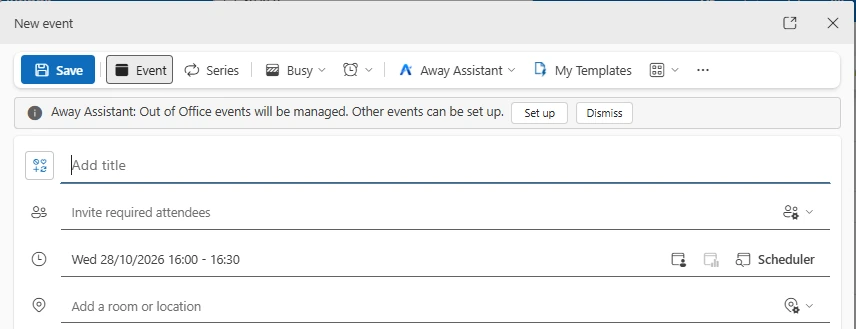
Create an Out of Office event as normal, or use Set up to opt in to managing a suitable Busy event.
Using your templates, preferences and event details, Away Assistant prepares the reply for that particular absence.
Back-to-back or overlapping managed events are joined together so Away Assistant can calculate when you are really returning.
Away Assistant updates the Automatic Reply with the new message, switches it on for the right period, and turns it off again when you are back.
Use Away Assistant as quietly as you want. Set your defaults once and leave it alone, or adjust the wording for an individual event whenever you need to.
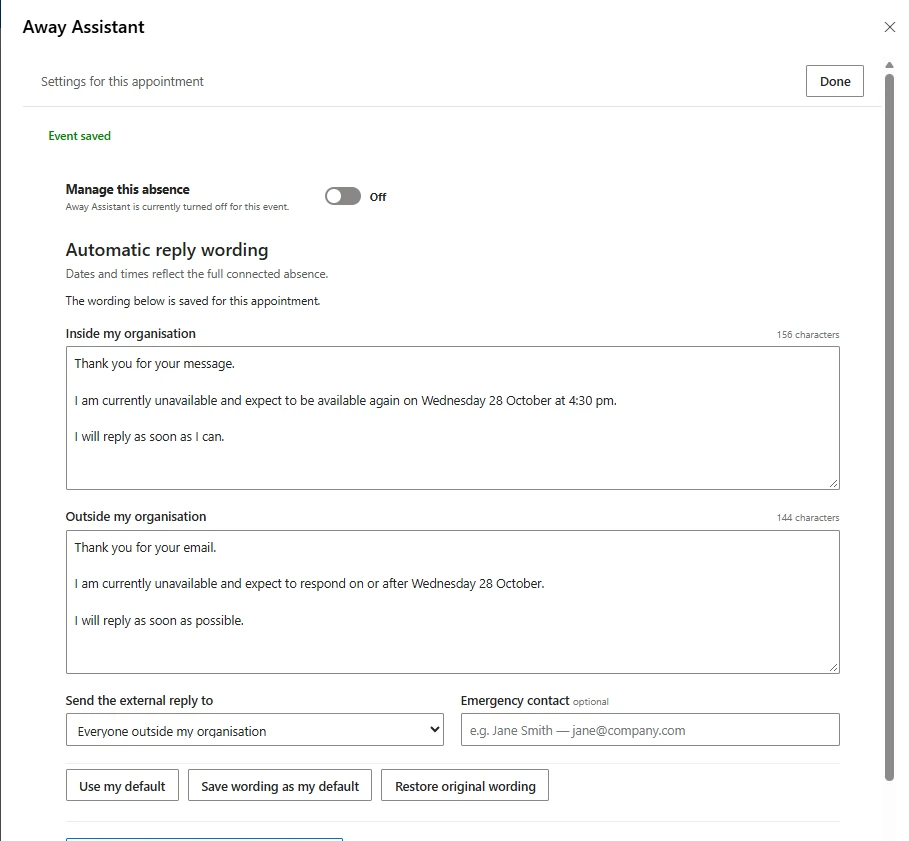
Each managed absence gets reply wording based on that event, including its calculated return time.
Away Assistant works out the full block and the correct return-to-work time instead of treating each event in isolation.
Your laptop or phone does not need to stay switched on or connected. The Away Assistant service keeps managing the schedule through Microsoft 365.
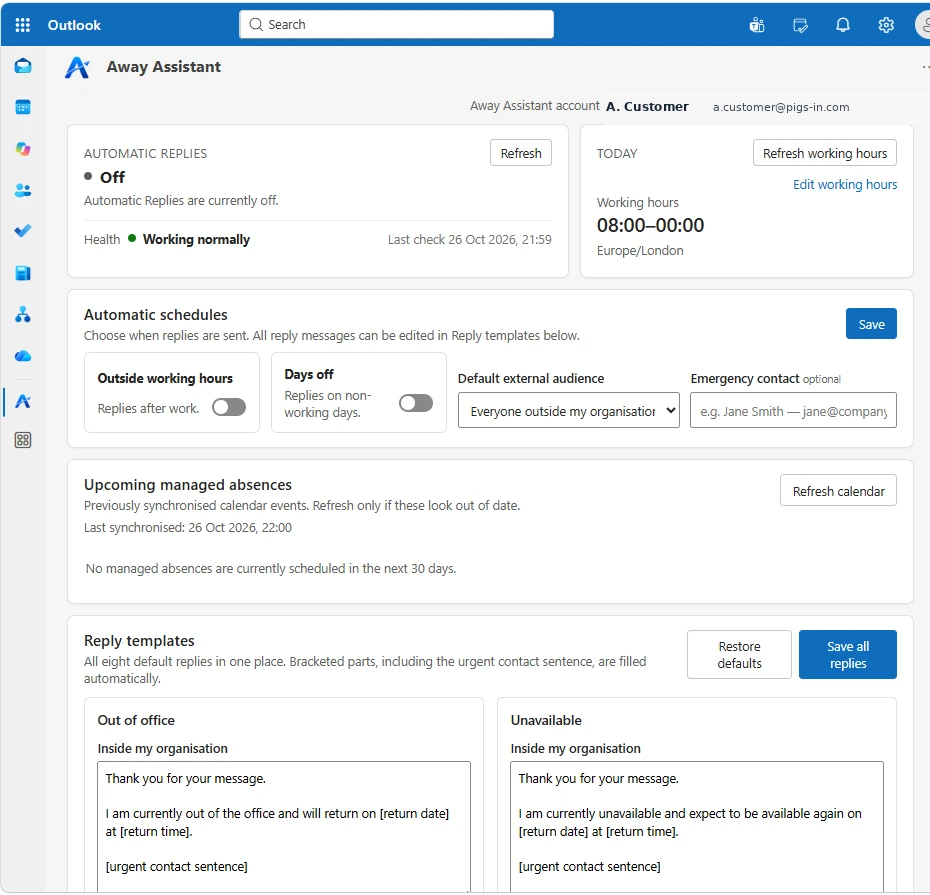
Save different defaults, edit them whenever you like, and prepare new replies without starting from scratch.
Edit each reply, save new defaults, restore your original wording, or let Away Assistant handle it automatically.
Optional schedules can manage replies outside working hours and on non-working days using your working-hours settings.
Five minutes here, another few minutes there, and across a team it adds up. Away Assistant turns a repetitive chore into a background process.
Automatic Replies are easy to forget because they are normally an extra task on top of the calendar entry that already records the absence. Away Assistant removes that additional chore.
You keep using Outlook the way you already do. Away Assistant adds the automation around it rather than asking people to maintain a separate absence system.
Away Assistant is a Microsoft 365 calendar-automation service that uses your Outlook calendar to manage Automatic Replies around your absences. It prepares the wording and timing, then manages when replies should be active.
Away Assistant is intelligent calendar automation rather than a generative AI chatbot. It uses your calendar information, saved templates and settings to calculate timings and prepare the right reply for each managed absence.
Away Assistant is designed to use the Microsoft 365 calendar details and settings required to manage absences and Automatic Replies. It does not need to read the contents of email messages to do this. We are reviewing requested permissions and security before public launch.
Out of Office events are managed automatically according to your settings. You can also choose to manage suitable Busy events, for example by selecting Set up in the Outlook appointment banner.
Yes. Optional automatic schedules can manage replies outside working hours and on non-working days, based on your working-hours settings.
Yes. You can edit your default templates, edit a particular event's reply, save that wording as a new default, or simply leave your defaults in place and let Away Assistant handle the routine work.
Away Assistant's automation runs in Microsoft 365, so it is not tied to one computer. The main experience is being tested in Outlook on Windows and Outlook on the web. Classic Outlook compatibility is part of launch testing. On a phone, scheduled automation continues to run in the cloud even when the full Away Assistant interface is not available in Outlook mobile. A dedicated mobile companion is planned.
No. Away Assistant is designed to run as a cloud service. Once your absence is scheduled, your own PC or phone does not need to remain switched on or have an internet connection for the service to manage the reply schedule.
Away Assistant can combine adjacent or overlapping managed events into one continuous absence block and calculate the return time for the complete block.
We are preparing for external testing. Email us to register your interest and hear when Away Assistant is available.